History Database
An optional local SQLite database that tracks all synced songs, actions, and sync runs for audit and visibility.
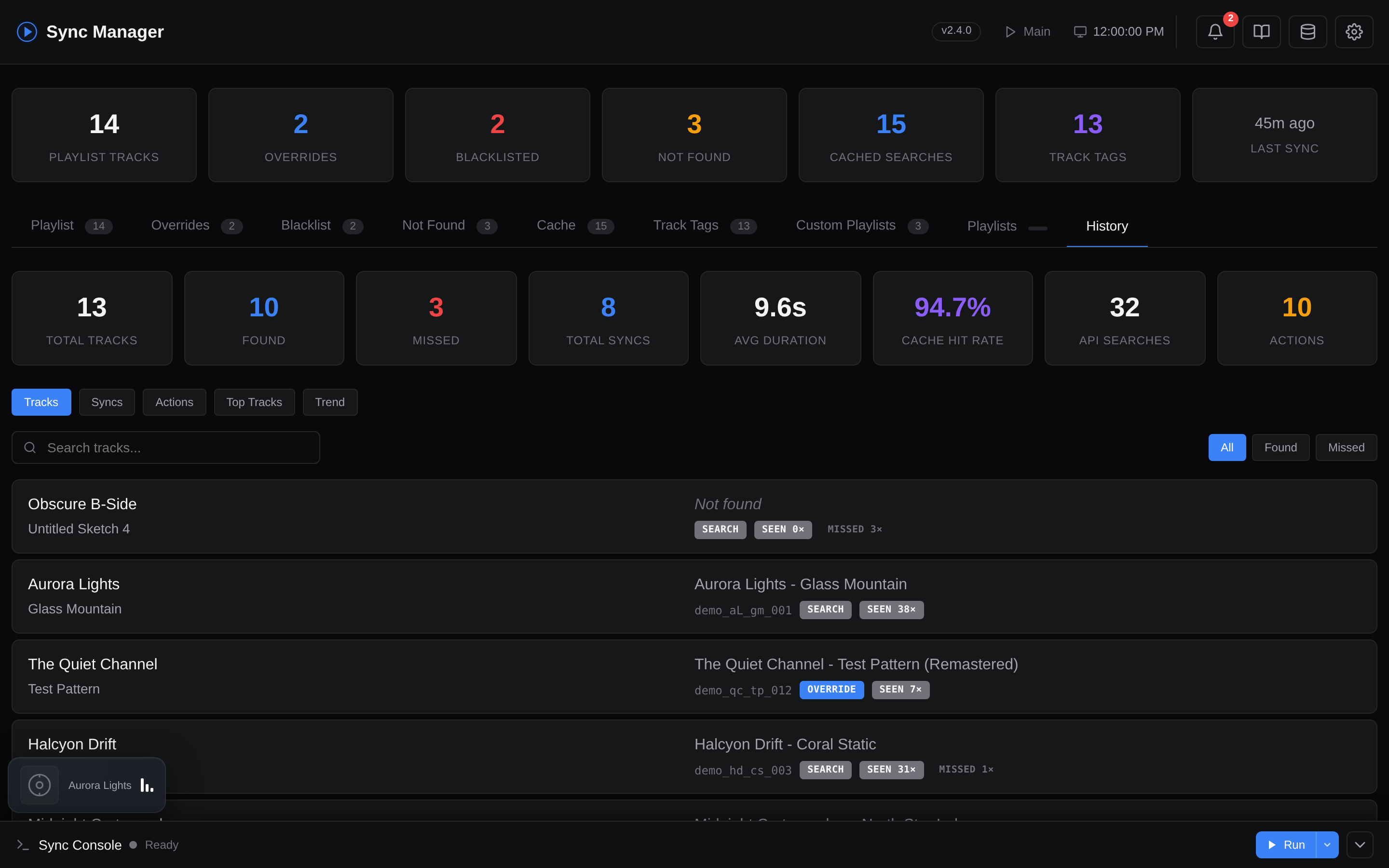
When enabled, a dedicated History tab appears in the web dashboard with six sub-views:
- Tracks - every song seen, with how often it was found vs. missed, first/last seen dates, and direct links to the matched video
- Syncs - every sync run with duration, track counts, cache hit rate, and API call totals
- Actions - every user action (override added, blacklist added, cache cleared, etc.)
- Top Tracks - your most-found tracks across the whole history
- Near Misses - tracks from the most recent main sync that resolved on YouTube Music but ranked just past your
LIMITcutoff (see below) - Trend - sync activity and match rates over time
Plus a stat-card bar across the top (totals, average sync duration, cache hit rate, API searches, action count, near-miss count) that doubles as a quick filter. You don't need to open the database file directly - everything is browsable in the UI.
Screenshot: History tab
What It Tracks
The database stores three types of records:
- Tracks - every song the sync engine encounters, including artist, title, matched video ID, match score, resolution source (cache/search/override), and how many times it was found or missed
- Syncs - a record of every sync run with timestamps, duration, track counts, API usage stats (searches, playlist operations, cache hits/misses, override hits), and final status
- Actions - user-initiated actions like adding overrides, blacklisting, or clearing cache entries (logged by the web dashboard)
When HISTORY_MAX_SIZE_MB is set to a non-zero value, the database auto-prunes the oldest records when the file exceeds the specified size. When HISTORY_RETENTION_DAYS is set, every successful main sync also deletes any syncs and actions rows older than the cutoff and VACUUMs the file to reclaim space. Track rows are kept (they are cumulative lookup state, not history).
Near Misses
The main playlist keeps only the top LIMIT tracks after ranking your recent scrobbles by recency and play count. Tracks that resolve to a real YouTube Music video but fall just past that cutoff are recorded as near-misses - "listened recently, but didn't quite make the playlist".
The Near Misses sub-view lists them ordered by rank (closest to the cutoff first), each with its recency-weighted score and play count. This is the most useful data for tuning:
- If songs you care about consistently show up as near-misses, raise
LIMIT. - If stale tracks are crowding out fresh ones, lower
RECENCY_HALF_LIFE_HOURS(or raise the recency weight) so recency counts for more.
Only the most recent main sync's near-misses are kept - the list is replaced on every run, and at most 100 rows (the ones closest to the cutoff) are stored. Near-misses are only meaningful with recency weighting enabled; scores and play counts are shown when available.
"Seen" vs "Played"
The dashboard surfaces two different per-track counters that are easy to confuse because they often disagree for the same song:
- Seen (the
times_foundcounter, shown as theseen N×badge and the Seen row in the Track Details modal) counts how many times the sync engine resolved this track to a YouTube Music video. It is incremented once per sync run that encounters the track, so a song that lingers in your recent-tracks window across many syncs accumulates a high "seen" count regardless of how often you actually listened to it. It is a pipeline/lookup metric, not a listening metric. - Played (the
N× playedbadge) is your lifetime Last.fm scrobble count and only appears when the local Last.fm history database is enabled. It reflects how many times you actually listened to the track.
Because they measure different things, "Seen" and "Played" are expected to differ - a track can show, say, 484× seen in the Track Details modal while the Top Tracks list shows 150× played. "Seen" tends to be higher when frequent syncs keep re-resolving the same track; "Played" only ever moves when you genuinely listen to the song again.
Maintenance
The History Database section in Settings exposes the DB-only maintenance actions:
- Backfill from Cache - one-shot import of your existing search cache and overrides as
cache_backfill/override_backfillrows so old lookups show up in the dashboard. - Vacuum & Prune - runs
prune_by_age()(ifHISTORY_RETENTION_DAYS > 0), thenprune_if_oversized()(ifHISTORY_MAX_SIZE_MB > 0), then a finalVACUUMto reclaim disk space. Useful after lowering either limit, or as a manual housekeeping trigger between syncs. Ahistory_vacuumaction is logged with the row counts that were removed. - Clear History Database - wipes every row from
tracks,syncs, andactions, thenVACUUMs. Irreversible.
Backup and restore live one section down in Settings → Data Management → History Database (visible only when the DB is enabled):
- Export - downloads the entire database as a JSON dump (
history-export-YYYYMMDDTHHMMSS.json) containing every row oftracks,syncs, andactions. Plain text JSON, no encryption - treat it like a personal listening journal. - Import - uploads a previously exported JSON dump. A modal asks whether to Merge or Replace:
- Merge is idempotent.
tracksare upserted on(artist, title)- counters take theMAXof both sides andfirst_seen/last_seenwiden to cover both sides.syncsare deduped on(started_at, sync_type)andactionsare deduped on(timestamp, action_type, artist, title, video_id, detail), so importing the same file twice will insert zero new rows the second time and counters won't double. The toast reports rows actually inserted. - Replace wipes the existing database first, then inserts everything from the file.
- Merge is idempotent.
The same JSON dump is what the Teleporter embeds when you tick the History database checkbox - import is always done in merge mode there to avoid wiping a working instance.
Configuration
Docker: Toggle via Settings → History Database.
CLI: Add to your .env:
HISTORY_DB_ENABLED=false               # Enable/disable the history database
HISTORY_DB_FILE=runtime/history.db     # Path to the database file
HISTORY_MAX_SIZE_MB=0                  # Auto-prune oldest records when exceeded (0 = unlimited)
HISTORY_RETENTION_DAYS=0               # Auto-delete syncs & actions older than N days after each sync (0 = keep forever)
| Variable | Default | Description |
|---|---|---|
HISTORY_DB_ENABLED |
false |
Track all songs, syncs, and actions in a local SQLite DB |
HISTORY_DB_FILE |
runtime/history.db |
Path to the history database file |
HISTORY_MAX_SIZE_MB |
0 |
Auto-prune oldest records when the file exceeds this size (0 = unlimited) |
HISTORY_RETENTION_DAYS |
0 |
After each sync, delete syncs & actions rows older than N days (0 = keep forever). tracks are always retained. |