Custom Playlists
Create automatic YouTube Music playlists that fill themselves with matching tracks from your scrobble history. Each custom playlist is one of four types:
- Tag playlists - include tracks by Last.fm tags/genres. For example, a "Breakcore Mix" playlist that only includes tracks tagged
breakcoreordrill and bass, or a "Chill Electronic" playlist that requires bothelectronicandambient. - Artist playlists - include every found track by one or more specific artists. For example, a "Radiohead & Aphex Twin" playlist that gathers all of those artists' tracks from your history.
- Discovery playlists - surface tracks you have never scrobbled, seeded from what you listen to most. For example, a "Discover Weekly" playlist that recommends new songs similar to your top artists or top tracks. See Discovery Playlists below.
- Template / filter playlists - build from your own listening history using reusable, composable filters (top tracks in a window, forgotten favorites, seasonal, and more). See Template / Filter Playlists below.
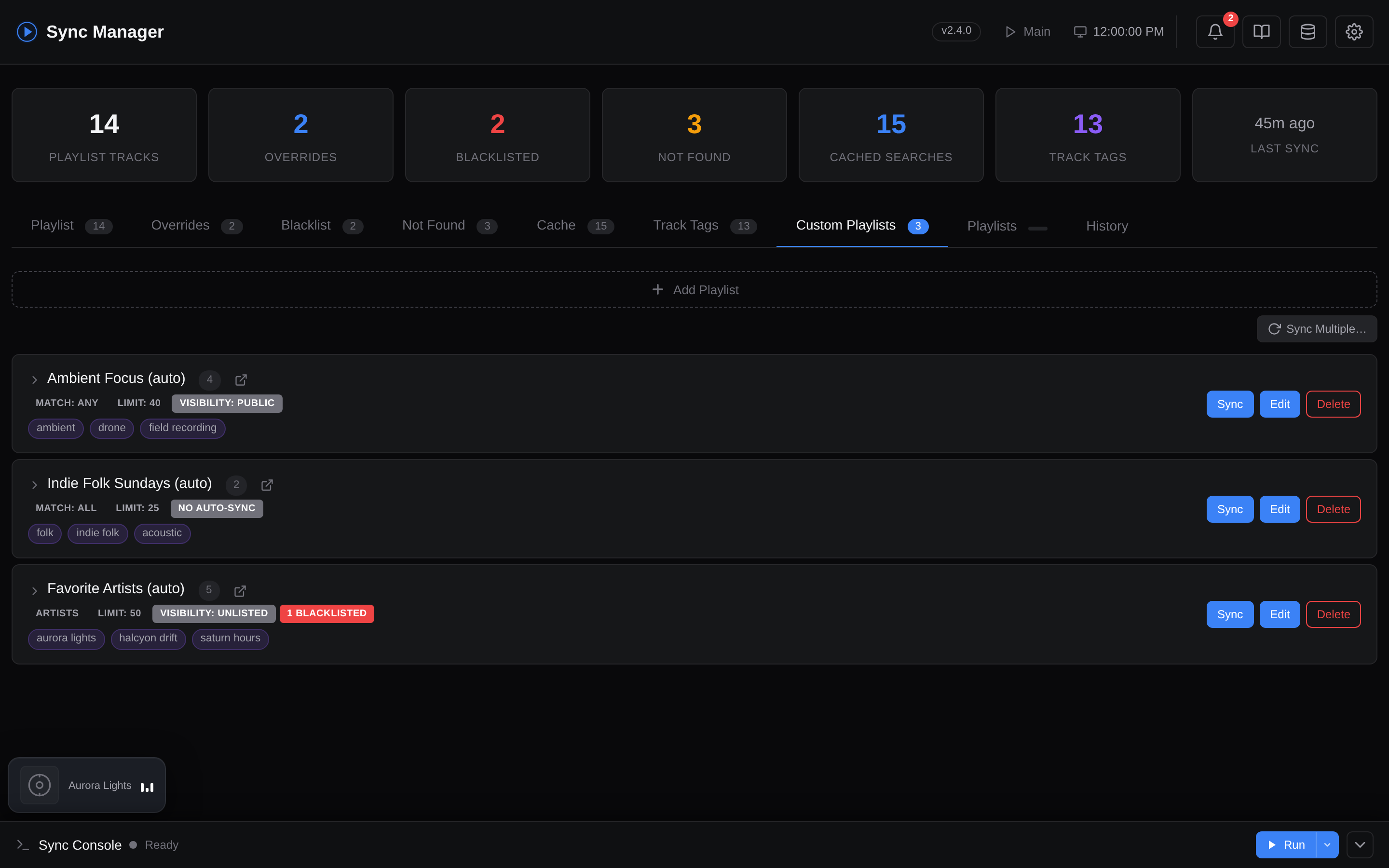
Screenshot: Custom Playlists editor
Related
Custom playlists honor the same _overrides, _blacklist, and _blacklist_artists you set up in Search Overrides, plus per-playlist blacklist/blacklist_artists fields (see Configuration below). Use tag overrides when Last.fm's tags are wrong; use search overrides when the matched video is wrong.
How Tags Are Resolved
Tag playlists use a cache-first approach to find each track's Last.fm tags (artist and discovery playlists skip this step entirely, since they don't match on tags):
- Tag overrides - check
config/tag_overrides.json(user manual fixes). If the override mode is"replace", the override tags are used directly and steps 2-3 are skipped. - Tag cache - check
runtime/.tag_cache.json(90-day TTL, configurable viaTAG_CACHE_TTL_DAYS) - Last.fm API - fetch via
track.getTopTags, falling back toartist.getTopTagsif track-level tags are unavailable
After fetching, "add" mode tag overrides are merged into the result (this allows supplementing Last.fm's tags without replacing them entirely).
Tags with fewer votes than TAG_MIN_COUNT (default: 10) are filtered out to avoid noise.
How TAG_MIN_COUNT shapes the playlist
This threshold decides how many tags each track is allowed to carry, which in turn decides how many tracks qualify:
- Raise it (e.g.
50) → only strong, widely-agreed tags survive, so fewer tracks match yourtagsand the playlist gets smaller and more precise (and may struggle to reachlimit, leaning harder on backfill). - Lower it (e.g.
1) → niche and noisy tags count too, so more tracks match and the playlist grows, at the cost of the occasional off-genre song.
If backfilling is enabled and a playlist has not reached its target track count after filtering, the tool automatically fetches more scrobbles and repeats until the limit is met or no more data is available.
Discovery Playlists
Tag and artist playlists are backward-looking: they filter tracks you have already scrobbled. Discovery playlists do the opposite - they recommend songs you have never scrobbled, turning the tool from an archivist into a curator.
How it works
- Seed - a set of seed artists or tracks is collected (whichever you pick via
discovery_seed). By default seeds are chosen automatically from your most-played artists/tracks, but you can also pick the seeds yourself (see Choosing your own seeds). - Expand - each seed is expanded through Last.fm's recommendation graph:
discovery_seed: "artists"→ finds similar artists (artist.getSimilar), then pulls each one's most popular songs (artist.getTopTracks).discovery_seed: "tracks"→ finds songs similar to your top tracks directly (track.getSimilar).
- Filter - unless the playlist opts out via
discovery_exclude_scrobbled: false, any candidate you have already scrobbled is dropped (that's not discovery). Anything on the playlist'sblacklist/blacklist_artistsis always dropped. Which scrobbles count as "already heard" depends on your history source and the rediscover window - see below. - Rank - remaining candidates are ordered by aggregated similarity score, then trimmed to
limit. - Match & sync - the surviving tracks flow through the exact same YouTube Music matching and sync engine as every other playlist.
What happens to a song once you've listened to it?
Discovery playlists are self-rotating. The moment you play one of the recommended songs, it becomes a scrobble in your Last.fm history. On the next sync:
- That song now appears in your listening history, so it lands in the "already scrobbled" exclusion set.
- Being excluded, it is dropped from the candidate pool - it will not be re-added to the playlist.
- Its slot is filled by a fresh, still-unheard recommendation.
Over repeated syncs the playlist naturally churns away from songs you've adopted and toward things you haven't heard yet. Songs you never played simply stay (as long as they remain top recommendations), while songs you liked and played "graduate" out and can show up in your normal tag/artist playlists.
The exclusion set is only as complete as your history source. With just the recent-scrobbles window, a song you played long ago (outside that window) can resurface. Turn on the local Last.fm database for full-history exclusion, then optionally use the rediscover window to deliberately let old favourites come back.
Excluding tracks you've already heard
By default every discovery playlist drops candidates you've already scrobbled, so you only ever see new-to-you songs. You can turn this off per playlist with discovery_exclude_scrobbled: false (or the Exclude tracks I have already scrobbled toggle in the editor):
- On (default) - only songs you've never played are recommended; the playlist self-rotates as described above.
- Off - songs from your listening history are allowed back into the pool. Useful for a "more like my favourites" playlist that can include tracks you already love, rather than strictly undiscovered ones.
When the exclusion is on, the rediscover window fine-tunes how far back counts as "already heard".
Full listening history (local DB)
Like the main playlist, all custom playlists - including discovery - use your full lifetime scrobble history when the local Last.fm database is enabled (USE_LOCAL_LASTFM_DB=true). This affects seeds and exclusions:
- Auto seeds are ranked by lifetime play counts instead of just the recent fetch window, so they reflect your all-time favourites.
- Exclusions cover your entire scrobble history, so discovery playlists won't recommend anything you've ever played (unless the rediscover window lets it back in).
When the local DB is off, custom playlists fall back to the recently fetched scrobble window (the same source the main playlist uses in recent-tracks mode).
The rediscover window
DISCOVERY_REDISCOVER_DAYS (a global setting in the dashboard under Settings → Playlists → Custom Playlists, default 0) lets old favourites resurface in discovery playlists that exclude already-heard tracks:
0(default) → exclude your entire history. Anything you've ever scrobbled is treated as "already heard" and will not be recommended.N > 0→ only tracks played within the last N days are treated as "already heard". Songs you last played more thanNdays ago become eligible to be rediscovered.
It applies whether you're using the recently-fetched scrobble window or the full local Last.fm database - though it's most powerful with the local DB, since full history plus real last-played timestamps let it reach much further back. Example: DISCOVERY_REDISCOVER_DAYS=365 resurfaces anything you haven't played in the past year. (Has no effect on playlists with discovery_exclude_scrobbled: false, which already keep everything.)
Choosing your own seeds
By default, discovery_seed_auto is true and seeds come from your most-played artists/tracks. Set it to false to hand-pick the seeds instead:
- In the web dashboard, turn off Auto-choose seeds in the discovery playlist editor and search/select seeds from your listening history.
- In
config/custom_playlists.json, setdiscovery_seed_auto: falseand providediscovery_seed_artists(fordiscovery_seed: "artists") ordiscovery_seed_tracks(fordiscovery_seed: "tracks").
This lets you build focused playlists like "Discover from Radiohead", "Discover from my favourite metal tracks", etc. - each pinned to seeds you chose. If manual mode is on but no seeds are provided, the playlist falls back to automatic seeds.
The seed picker's options come from your local Last.fm database when enabled (ranked by plays), otherwise from your resolved search cache.
Which seed should I use?
discovery_seed |
Best for | Character |
|---|---|---|
"artists" (default) |
Broad exploration | Pulls popular songs from artists adjacent to your taste - a wider net across new-to-you acts |
"tracks" |
Deep, song-level similarity | Recommends individual songs close to specific favorites - tends to stay closer to your existing sound |
Notes & limitations
- Discovery playlists need only a
name- notagsorartistsare required. - Backfill does not apply. Candidates are generated with built-in headroom up front, so the scrobble-based backfill loop is skipped (the
backfillfield is ignored). - Recommendation quality depends on Last.fm's data for your seeds; very obscure seeds may return few similar results.
- The "already scrobbled" exclusion is based on your recently fetched scrobbles unless the local Last.fm database is enabled (then it covers your full history). Use
DISCOVERY_REDISCOVER_DAYSto intentionally let older plays resurface, ordiscovery_exclude_scrobbled: falseto disable the exclusion entirely for a playlist.
Template / Filter Playlists
Filter playlists ("kind": "filter") build a playlist from your own listening history using a small set of composable, reusable filters - rather than a hard-coded rule per playlist type. You can pick a ready-made preset or drop to custom and combine the primitives yourself.
Presets
Each preset expands into the same underlying filter engine, so you can start from one and tweak it:
| Preset | What it selects |
|---|---|
top_tracks_7d / top_tracks_30d / top_tracks_90d |
Your most-played tracks in the last 7 / 30 / 90 days |
forgotten_favorites |
Genuine favourites you've drifted away from, measured relative to your own library: tracks in the top ~25% by play count that you've gone quiet on for longer than most of your collection. This scales naturally - it might mean "played 4 times, silent a month" for a small library or "played 280 times, silent two years" for a huge one. Tiny floors (a track must be replayed at least twice and quiet for at least ~2 weeks) only rule out single-listens and brand-new libraries; they don't set the bar for a normal collection |
not_played_6mo |
Tracks you haven't played in ~6 months (182 days), oldest first |
active_artists |
One track per artist you've listened to in the last 30 days, most recent first |
rediscovered_artists |
Long-known artists you've circled back to, measured relative to your own library (same dynamic approach as forgotten_favorites): tracks you first heard longer ago than most of your collection but have played again within your recent listening cohort. One track per artist, most recently revisited first. Scales from "first heard a year ago, back this month" to "first heard five years ago, back this quarter"; small floors keep it sane (can't rediscover a brand-new track; "recently" is at least ~a month) |
new_to_me |
Tracks you first heard in the last 30 days, newest discoveries first |
seasonal |
Tracks whose plays fall in the current season's months, by play count |
Custom filters
Set "filter_template": "custom" and provide a filters object. All fields are optional and combine with AND:
| Field | Type | Meaning |
|---|---|---|
min_plays |
int | Keep tracks with at least this many lifetime plays |
max_plays |
int | Keep tracks with at most this many plays (0 = no cap) |
played_within_days |
int | Last played within the last N days |
not_played_within_days |
int | Not played in the last N days (stale) |
first_played_within_days |
int | First heard within the last N days (new to you) |
first_played_before_days |
int | First heard more than N days ago (long-known) |
months |
list[int] | Keep tracks whose last play falls in these months (1–12) |
per_artist_limit |
int | Cap the number of tracks kept per artist (0 = unlimited) |
sort |
string | Ordering: plays, recent, stale, first_seen, or random |
Data source & the local DB
Time-based filters need play history. When the local Last.fm database is enabled (USE_LOCAL_LASTFM_DB=true), filters run over your full history with accurate play counts and first/last-played timestamps. When it's disabled, the engine degrades gracefully and works from the most recently fetched scrobbles only - so windows longer than your fetch depth (and lifetime play counts) will be approximate. Enable the local DB for the best results.
Notes & limitations
- Filter playlists need only a
name(like discovery playlists) - notagsorartists. - Backfill does not apply; the candidate pool is generated up front.
- Release-date templates (decade/year and "newly released") are not yet available because release-date metadata isn't stored. Everything above is derived from when you played a track, not when it was released.
Overlap with the main playlist is expected
forgotten_favorites (and other high-play filters) can share tracks with your main playlist. This is structural, not a bug: the main playlist ranks partly on lifetime play count (RECENCY_PLAY_WEIGHT), so with a large LIMIT and a play-weighted mix its long tail is your all-time favourites - regardless of how recently you played them. Those same heavily-played tracks are exactly what "forgotten favourites" targets, so genuine favourites you've drifted from can legitimately appear in both.
Filter playlists are scored independently and do not exclude tracks already in another playlist. If you want less overlap you can lower LIMIT, or lower RECENCY_PLAY_WEIGHT so the main playlist leans more on recent listening than lifetime plays, or narrow the filter (e.g. a custom spec with a longer not_played_within_days). Some overlap is inherent to the definition and can't be fully removed by tuning alone.
Example:
{
  "playlists": [
    { "name": "Top Tracks - Last 30 Days", "kind": "filter", "filter_template": "top_tracks_30d", "limit": 50 },
    { "name": "Forgotten Favorites", "kind": "filter", "filter_template": "forgotten_favorites" },
    {
      "name": "Summer Rewind",
      "kind": "filter",
      "filter_template": "custom",
      "filters": { "months": [6, 7, 8], "min_plays": 3, "sort": "plays" }
    }
  ]
}
Configuration
Docker: Use the web dashboard to create and manage custom playlists. Pick the Playlist Type (genre tags, artists, discovery, or template/filter) in the editor. Sync can be triggered manually from the UI, or automatically after each scheduled main sync via AUTO_TAG_SYNC_ENABLED and AUTO_TAG_SYNC_FREQUENCY (see Configuration).
CLI: Edit config/custom_playlists.json directly:
1. Create the config file
2. Define your playlists
{
  "playlists": [
    {
      "name": "Breakcore Mix (auto)",
      "tags": ["breakcore", "drill and bass"],
      "match": "any",
      "limit": 50,
      "backfill": true,
      "blacklist": []
    },
    {
      "name": "Ambient Electronic (auto)",
      "tags": ["ambient", "electronic"],
      "match": "all",
      "limit": 30,
      "backfill": true,
      "privacy": "PUBLIC",
      "blacklist": ["artist name|unwanted track"],
      "blacklist_artists": ["unwanted artist"]
    },
    {
      "name": "My Favorite Artists (auto)",
      "kind": "artists",
      "artists": ["radiohead", "aphex twin"],
      "limit": 50,
      "backfill": true
    },
    {
      "name": "Discover Weekly (auto)",
      "kind": "discovery",
      "discovery_seed": "artists",
      "limit": 50,
      "privacy": "PRIVATE"
    },
    {
      "name": "Discover from Favourite Artists",
      "kind": "discovery",
      "discovery_seed": "artists",
      "discovery_seed_auto": false,
      "discovery_seed_artists": ["radiohead", "boards of canada"],
      "limit": 50,
      "privacy": "PRIVATE"
    }
  ]
}
| Field | Required | Description |
|---|---|---|
name |
yes | Playlist name on YouTube Music |
kind |
no | "tags" (default), "artists", or "discovery" |
description |
no | Optional playlist description (empty = auto-generated) |
tags |
tag playlists | Last.fm tags to match against (required when kind is "tags") |
artists |
artist playlists | Lowercase artist names to include (required when kind is "artists") |
discovery_seed |
no | Discovery playlists only: "artists" (default) or "tracks" - see Discovery Playlists |
discovery_seed_auto |
no | Discovery playlists only: true (default) auto-seeds from your most-played artists/tracks; false uses the seeds you provide below |
discovery_seed_artists |
no | Discovery playlists only (when discovery_seed_auto is false and discovery_seed is "artists"): list of artist names to seed from |
discovery_seed_tracks |
no | Discovery playlists only (when discovery_seed_auto is false and discovery_seed is "tracks"): list of { "artist": "...", "track": "..." } objects to seed from |
discovery_exclude_scrobbled |
no | Discovery playlists only: true (default) recommends only songs you've never scrobbled; false lets tracks from your listening history back into the playlist. See Excluding tracks you've already heard |
match |
no | "any" (track has at least one tag, default) or "all" (track has every tag). Tag playlists only. "any" casts a wide net → bigger playlist; "all" is strict AND logic → smaller, tightly-filtered playlist (e.g. ["ambient", "electronic"] with "all" keeps only tracks tagged both) |
limit |
no | Target number of tracks (default: 50) |
backfill |
no | Fetch more scrobbles if filtering doesn't reach the limit (default: true). Ignored by discovery playlists |
privacy |
no | Per-playlist visibility: "PUBLIC", "UNLISTED", or "PRIVATE" (omit/empty to inherit the global CUSTOM_PLAYLISTS_PRIVACY setting) |
blacklist |
no | Per-playlist exclusions as "artist\|title" (lowercase) |
blacklist_artists |
no | Per-playlist artist exclusions (lowercase artist names) |
Environment Variables
| Variable | Default | Description |
|---|---|---|
CUSTOM_PLAYLISTS_FILE |
config/custom_playlists.json |
Path to playlist definitions |
TAG_CACHE_TTL_DAYS |
90 |
Days before cached tags expire |
TAG_MIN_COUNT |
10 |
Minimum Last.fm tag count threshold |
TAG_SLEEP_BETWEEN |
0.25 |
Seconds between tag API calls |
CUSTOM_PLAYLISTS_PRIVACY |
(main setting) | Default privacy for custom playlists (PUBLIC / UNLISTED / PRIVATE). Overridable per playlist with the privacy field above |
DISCOVERY_REDISCOVER_DAYS |
0 |
Discovery playlists (that exclude already-heard tracks): only exclude tracks played within the last N days (0 = exclude your entire history). Works with both recent scrobbles and USE_LOCAL_LASTFM_DB. Set it in the dashboard under Settings → Playlists → Custom Playlists. See The rediscover window |
BACKFILL_PASSES |
3 |
Maximum backfill iterations |
Tag Overrides
When Last.fm's tag data is wrong or incomplete, you can manually fix it.
Docker: Use the web dashboard's tag management interface.
CLI: Edit config/tag_overrides.json directly:
1. Create the overrides file
2. Add your override
{
  "_overrides": {
    "artist name|song title": {
      "artist": "Artist Name",
      "title": "Song Title",
      "tags": ["breakcore", "electronic"],
      "mode": "add",
      "reason": "Last.fm only has 'electronic', adding 'breakcore'"
    }
  }
}
| Field | Description |
|---|---|
| Key | artist\|title in lowercase |
tags |
List of tag names to apply |
mode |
"add" merges with existing Last.fm tags, "replace" overwrites them entirely |
reason |
Optional note for your reference |
Running Custom Sync
Custom playlists (tag-, artist-, and discovery-based) are synced separately from the main playlist. Use the dedicated entry point:
Warning
python run.py only runs the main playlist sync. Custom playlists must be triggered separately via run_tags.py or from the web dashboard (the Sync / Sync Multiple… buttons on the Custom Playlists tab).
Syncing specific playlists
The run menu's Custom Playlist Sync rebuilds every configured custom playlist. To refresh just one (or a handful) without touching the rest, use the Custom Playlists tab instead:
- Each playlist card has its own Sync button that rebuilds only that playlist.
- The Sync Multiple… button in the toolbar opens a dialog where you tick one or more playlists (or none, to sync all) and rebuild exactly those in a single run.
Both routes reuse the same engine as a full custom sync - they simply restrict it to the chosen playlist names - so backfill, blacklists, and limits all behave identically. Auto-sync exclusions are ignored for these manual runs: a playlist marked No Auto-sync is still rebuilt when you sync it explicitly.